SimAgent
An Emulation Sandbox for Software-defined Protocol Testing and Evaluation
Introduction
While most wireless network simulation frameworks offer configuration options, many lack a clear framework for integrating software-defined protocol stacks provided by users. This leaves evaluation of software-defined network toolchains to custom frameworks, which may be challenging to design or share with members of the wireless research community.
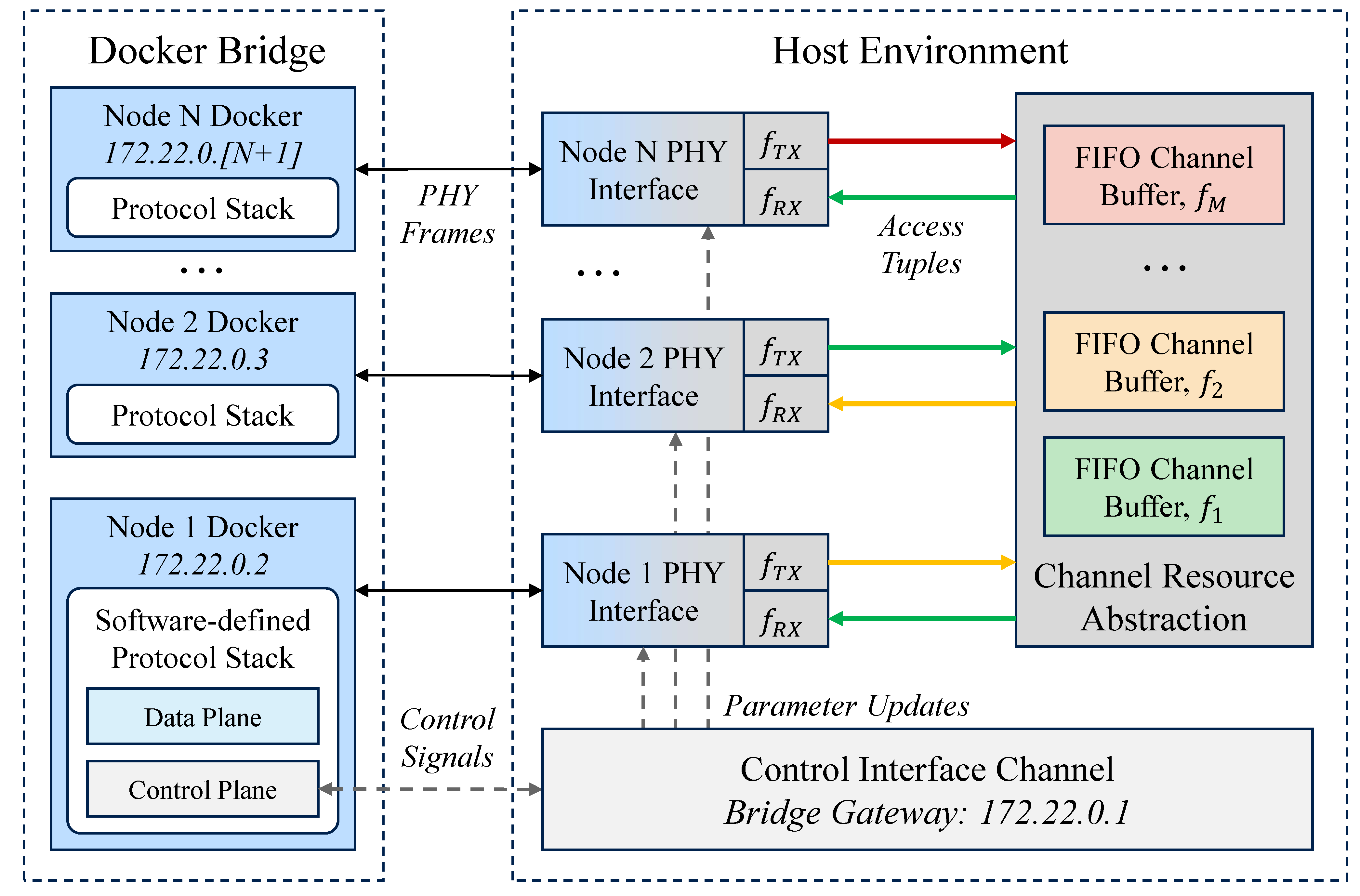
SimAgent is a lightweight software testbench designed to simplify behavioral evaluation of software-defined wireless network protocols through a containerized networking interface and abstracted channel model. While existing network simulation tools may impose compatibility restrictions with regards to programming language or event-based synchronization, the containerized design supports standalone operation of containerized node instances across a layer-agnostic socket interface. This reduces integration requirements and streamlines evaluation steps to minimize complexity in behavioral evaluation of software-defined networking tools ranging from individual signaling algorithms as well as full-scale software-defined protocol stacks.
Overview
Software & Hardware Prerequisites
Hardware Requirements
While SimAgent does not require any specific hardware configuration, computational load during operation will naturally increase with the scale and complexity of the software under test as well as the target networking scenario. While strict configuration limits will vary based on the specifications of the device running the SimAgent testbench, we recommend running fewer simultaneous node instances than the number of available processor threads of the device running SimAgent for best performance.
Software Requirements
- Docker Engine: recommend version 29 or later (developed using 29.5.2)
- Python: recommend version 3.10 or later (developed using 3.10.14)
- Ubuntu: recommend version 22.04 or later (developed using 24.04)
Recommended Tools
- X11: SimAgent is configured to use X11 forwarding for protocol stacks which require a graphical interface; if this is not supported by the user software, configuration options may depend on alterations to the source code
- Anaconda: Python environment managment within Docker containers is handled using Anaconda by default, which allows users to install dependencies automatically as outlined below; use of this feature is optional, but alternative environment management strategies will require manual configuration of the SimAgent source code
Knowledge Prerequisites
Users must be familiar with Dockerfile composition, including syntax, execution, and file system interactions to enable network protocol integration (further reading on Dockerfile composition). We recommend familiarity with Docker Network configuration to help troubleshoot configuration issues.
Users must also be familiar with Shell Command Language to configure the automated network startup scripts.
We recommend familiarity with Unix sockets, including addressing, general capabilities and limitations, and Python implementation for general use beyond the scope of this documentation.
We recommend a basic understanding of wireless communications, such as channel properties and modeling, for extension or manipulation of the basic channel abstraction, which is also beyond the scope of this documentation.
Setup Guide
Installation
Ensure Docker has been configured correctly on the host machine (see the Docker Installation guide for more info).
(Optional) Ensure X11 forwarding is available on the host machine.
-
echo $DISPLAY: should return display ID (e.g. ":1") if environment variable is set correctly - xclock: will open a small clock window if X11 is working
Clone the repository, e.g.: git clone git@github.com:WingsLabWireless/SimAgent.git
WARNING: step-by-step documentation beyond this point is still being generated and additional details will be provided ASAP.
Deploy user code in the ProtocolFolder, and update the automated startup script protocol_script.sh.
Modify the Dockerfile.
(Optional) Modify the .dockerignore.
Modify the startup script start_emulator.sh.
Configure container ports.
Default Container Network
Placeholder text.
Shared Channel Abstraction
Placeholder text.
License
SimAgent is released under the MIT License.